
Check Aadhaar Enrollment Status Online Check Update
No more waiting weeks for updates! With UIDAI’s Aadhaar Status Check, you can easily
track whether your Aadhaar has been generated, is under verification, or requires re-
enrollment, all in just a few clicks.
Why Aadhaar Enrollment Status Check is Important
Earlier, people who applied for Aadhaar had to wait without knowing the progress of their application. There were long queues at centers, postal delays, and no digital tracking.
Today, Aadhaar is essential for various purposes, including opening a bank account, linking a PAN, applying for scholarships, receiving government benefits, or even activating SIM cards.
Thanks to the UIDAI Aadhaar enrollment status check, residents can now check the real-time status of their Aadhaar application and take action immediately.
What Is Aadhaar Card Enrollment?
Aadhaar card enrollment is the process through which an Indian resident provides biometric and demographic information to the Unique Identification Authority of India (UIDAI) for identity creation. Each applicant’s data undergoes de-duplication to ensure that every Aadhaar number is unique and verified.
What is UIDAI Aadhaar Card Enrollment Status?
Once you enroll, UIDAI begins verifying your submitted data. The Aadhaar Enrollment Status reflects your current stage in that process. It shows if:
- Aadhaar has been generated (ready for download).
- The application is still being verified.
- Enrollment was rejected due to a document or biometric mismatch.
The usual processing period is 7–90 days, depending on the accuracy of data and system workload.
Eligibility for My Aadhaar Enrollment
- Indian Residents: Any individual living in India, irrespective of age or gender.
- NRIs (Non-Resident Indians): Eligible if they have resided in India for at least 182 days within the last 12 months.
- Children: Newborns and minors can also enroll, and a special Baal Aadhaar is issued for those under 5 years.
Prerequisites for Checking Aadhaar Enrollment Status on the UIDAI Portal
| Requirement | Details |
|---|---|
| Enrollment ID (EID) | 28-digit code (14-digit enrollment number + 14-digit date/time) printed on your acknowledgment slip. |
| Acknowledgment Slip | Contains the enrollment timestamp needed to identify your record. |
| Registered Mobile Number | Required for OTP-based verification. Without this, an online status check isn’t possible. |
| Internet Access | Needed to check via the UIDAI portal or mAadhaar app. |
| Alternate Options | Call the UIDAI helpline 1947 or visit a Seva Kendra if you can’t access the internet. |
Documents Required for Aadhaar Enrollment on uidai.gov.in aadhaar
You must submit one valid document from each category:
1. Proof of Identity (PoI)
Passport, PAN card, Voter ID, Driving Licence, or Government-issued photo ID.
2. Proof of Address (PoA)
Utility bill, bank passbook, rent agreement, passport, or ration card.
3. Proof of Date of Birth (DoB)
Birth certificate, SSLC certificate, or PAN card.
4. Proof of Relationship (PoR)
For dependents, a ration card, marriage certificate, or any other document showing a relationship to the Head of Family (HoF).
Methods of Aadhaar Enrollment
UIDAI provides multiple options to help residents complete Aadhaar enrollment based on their available documents and situation. Each method ensures every individual, including those without formal proof, can successfully obtain an Aadhaar number.
1. Enrollment at Aadhaar Seva Kendra (ASK) / Permanent Enrolment Centre (PEC)
The most common and straightforward method is visiting an authorized Aadhaar Seva Kendra (ASK) or Permanent Enrolment Centre (PEC).
Steps to Enroll:
- Locate your nearest Aadhaar Seva Kendra or PEC using the UIDAI “Locate Enrolment Centre” tool.
- Carry original documents for Proof of Identity (PoI), Proof of Address (PoA), Date of Birth (DoB), and Proof of Relationship (PoR), if applicable.
- Fill out the Aadhaar Enrollment Form provided at the center (or pre-fill it online and take a printout).
- Submit your documents for verification by the enrollment officer.
- Provide your biometric data (photograph, fingerprints, and iris scan).
- Review all details carefully before confirmation.
- Receive your acknowledgment slip containing a 28-digit Enrollment ID (EID).
- Use this EID to check your Aadhaar enrollment status later on UIDAI’s website or mAadhaar app.
Important Tip: There are no charges for new Aadhaar enrollment. However, updates or corrections may have a small fee depending on the service.
2. Enrollment Without Documents (Introducer System)
UIDAI ensures that even residents without valid documents can still enroll through an Introducer System. The “Introducer” is an authorized individual (usually a government officer, bank official, or verified UIDAI representative) who confirms your identity and address.
Steps to Enroll Without Documents:
- Visit the nearest Aadhaar Seva Kendra that supports Introducer-based enrollment.
- Provide your basic personal details (name, date of birth, gender, and address).
- The Introducer (registered with UIDAI) must be present during the enrollment process.
- The Introducer authenticates your identity using their Aadhaar number and signature/thumbprint.
- Provide biometric data (photograph, fingerprints, and iris scan).
- Collect your acknowledgment slip with the 28-digit Enrollment ID (EID).
- Use this EID later to track your Aadhaar enrollment status.
Important Note: This system is primarily used for individuals from marginalized backgrounds, migrants, and those without formal identity proofs.
3. Head of Family (HoF)-Based Enrollment
For family members who don’t have valid documents, UIDAI allows enrollment based on the Head of Family’s Aadhaar. This method is common for spouses, children, or dependents living in the same household.
Steps for HoF-Based Enrollment:
- Visit an Aadhaar Seva Kendra or PEC with the Head of Family.
- Provide the HoF’s Aadhaar number and a Proof of Relationship (PoR) document, such as a ration card or family certificate.
- The HoF must be physically present to verify and authenticate the relationship.
- Submit other required details like name, age, and address (which must match the HoF’s Aadhaar).
- Biometric data (fingerprints, iris scan, photograph) will be collected for the new applicant.
- Once done, receive your acknowledgment slip with EID to track the status online.
4. Enrollment for Children (Baal Aadhaar)
UIDAI issues a special blue-colored Baal Aadhaar card for children below 5 years of age. It helps link them to various child-centric schemes and services.
Steps for Baal Aadhaar Enrollment:
- Visit the nearest Aadhaar Seva Kendra or PEC with the child and one parent/guardian.
- Carry the child’s birth certificate and the parent’s Aadhaar card.
- Fill out the child enrollment form with the parent’s Aadhaar as proof of relationship.
- The child’s photograph is captured (no biometric data is taken before age 5).
- Review details and confirm accuracy.
- Receive the acknowledgment slip containing the Enrollment ID (EID).
- Use EID to track the child’s Aadhaar enrollment status online.
- Once the child turns 5, visit a center again for biometric updates, and once more at age 15.
Important Note: The Baal Aadhaar card is blue in color and automatically linked to the parents’ Aadhaar until biometrics are updated.
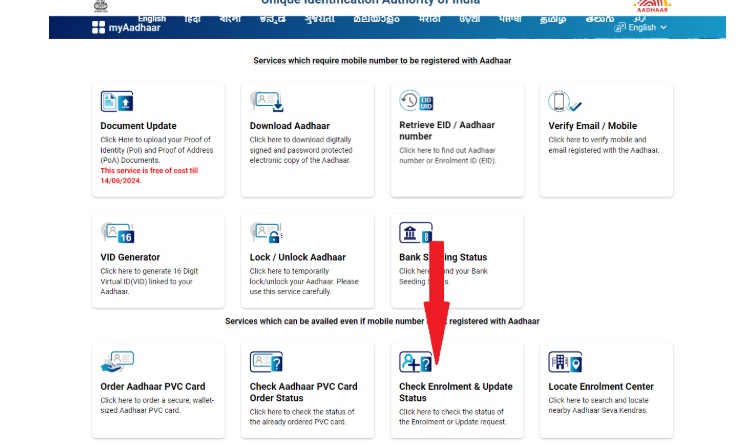
How to Check Aadhaar Enrollment Status Online
Follow these simple steps to check your Aadhaar application status:
- Go to the official UIDAI website (uidai.gov.in login).
- Click My Aadhaar → Check Aadhaar Status.
- Enter your 28-digit Enrollment ID (EID) and captcha code.
- Verify via OTP sent to your registered mobile number.
- The portal will show one of the following:
- Aadhaar Generated: You can download e-Aadhaar immediately.
- Under Process: Still being verified.
- Aadhaar Generated: You can download e-Aadhaar immediately.
Rejected: Needs re-enrollment.
Common Issues & Fixes
| Issue | Reason | Solution |
|---|---|---|
| OTP Not Received | Mobile not linked or network delay. | Ensure your number is registered; retry after a few minutes. |
| Lost Enrollment ID | Misplaced acknowledgment slip. | Retrieve EID using UIDAI’s “Retrieve UID/EID” service. |
| Status Pending Too Long | Delay in backend verification. | Visit a Seva Kendra or call 1947 if pending over 90 days. |
| Technical Errors | Temporary server issue. | Try again later or use the mAadhaar app. |
What to Do If Enrollment Status Is Pending Too Long?
If your Aadhaar status remains “Under Process” for over 90 days:
- Visit the nearest Aadhaar Seva Kendra with your documents.
- Call the UIDAI helpline 1947 and raise a complaint.
- File an online grievance through UIDAI’s official portal.
- If unresolved, re-enroll with updated documents and biometrics.
FAQs
Once your status indicates that Aadhaar has been generated, you can get Aadhaar by downloading the e-Aadhaar PDF via UIDAI’s portal or mAadhaar app. Use your Enrollment ID or Aadhaar number, authenticate with OTP, and then save or print the PDF.
No. You don’t need to log in permanently. Checking enrollment status works via OTP-based verification using your registered mobile number along with your Enrollment ID (EID). The process does not require a full “my Aadhaar login” account.
You can perform my Aadhaar download as soon as your Aadhaar status changes to “Generated.” Log in to the UIDAI portal or mAadhaar app, enter your details and OTP, then download the PDF. The digital copy is legally valid and available instantly after generation.
If your status is “Under Process,” UIDAI is still verifying your biometric and demographic data. This typically resolves within 7 to 90 days, depending on verification load and document accuracy. You’ll be able to get Aadhaar via download once the status shifts to “Generated.”
Yes. You can use your Enrollment ID (EID), printed on your acknowledgement slip, to check your status without knowing your Aadhaar number or logging in. If you lose your EID, use UIDAI’s “Retrieve Lost UID/EID” service using your registered mobile or email.