
Aadhaar Card Status Check Online Track in Seconds
Applied for UIDAI Aadhaar recently, updated your details, or ordered a PVC Aadhaar card? Don’t wait in uncertainty. With UIDAI’s Aadhaar Status Check services, you can track the progress of your application or request instantly whether it’s enrollment, correction, PVC printing, or even a complaint.
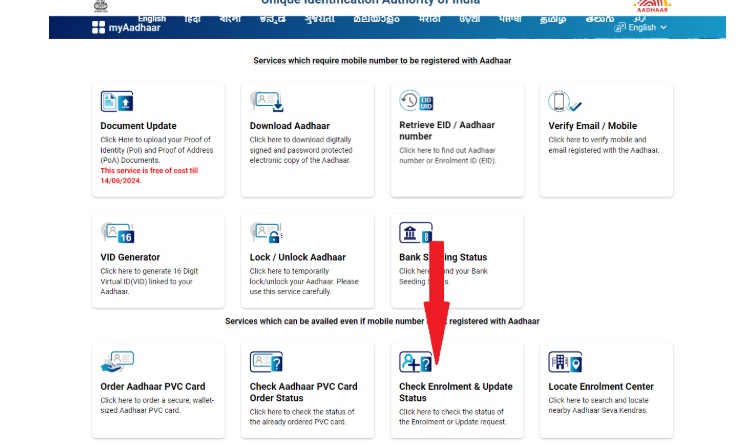
Why Aadhaar Status Check Matters
Before UIDAI introduced online tracking of Aadhaar status, residents had to wait blindly for weeks without knowing if their Aadhaar was processed, dispatched, or delayed. People often had to:
- Visit enrollment centers multiple times.
- Wait for postal deliveries without updates.
- Face stress when Aadhaar was urgently needed for banking, SIM activation, travel, school admission, or government subsidies.
The online status check system solved this problem. Now, residents can know the real-time status of Aadhaar anytime, which results in improved transparency, saved time, and reduced hassle.
Prerequisites for Checking Aadhaar Status on UIDAI Portal
A 28-digit number printed on your acknowledgment slip after enrollment.
It includes a 14-digit enrollment number and a 14-digit date/time stamp.
Required for checking whether a new Aadhaar has been generated.
Issued when you request a correction or update (like address, mobile, or name).
Helps track whether your update is approved, rejected, or pending.
Generated when you apply for a PVC Aadhaar card online.
Used to track printing, dispatch, and delivery of the PVC card.
Crucial for OTP-based authentication.
Without a registered mobile, you cannot check the status online.
If your number is not linked, update it at an Aadhaar Seva Kendra before proceeding.
A stable internet connection is required for using the UIDAI portal or the mAadhaar mobile app.
Recommended browsers: Chrome, Firefox, Edge, or Safari.
If your status shows that Aadhaar is generated, you’ll need a PDF reader (like Adobe Acrobat Reader or mobile PDF apps) to open the password-protected Aadhaar file.
Types of Aadhaar Card Status Checks
UIDAI provides multiple tools so you always know where your Aadhaar card request stands. Each status type addresses a different need:
Aadhaar Enrollment Status Check
When you first apply for Aadhaar, you get a 28-digit Enrollment ID (EID) on your acknowledgment slip. Using this, you can check whether your Aadhaar number has been generated or if it is still under process. Once generated, you can download your e-Aadhaar instantly.
Steps to Check Enrollment Status:
- Visit the official UIDAI portal → “Check Aadhaar Status.”
- Enter your 28-digit Enrollment ID (EID) and captcha code.
- Authenticate using OTP sent to your registered mobile number.
- The system will display whether Aadhaar has been generated or is still in process.
- If generated, you can immediately download your e-Aadhaar PDF.
Aadhaar Update / Correction Status
If you request updates such as a change of address, correction of name, date of birth, or mobile number, you receive an Update Request Number (URN). With this, you can track whether your update was successful, rejected, or pending.
Steps to Check Update Status:
- Go to the UIDAI portal → “Check Update Status.”
- Enter your Aadhaar number and the 14-digit URN.
- Fill in the captcha and verify with OTP.
The portal will show the outcome: Successful, Rejected, or Pending Review.
PVC Aadhar Card Online Order Status
Applied for the new PVC Aadhaar card online? Track its printing and delivery status using the Service Request Number (SRN) provided by UIDAI. Once dispatched, you can even track it via India Post with the consignment number.
Steps to Track PVC Aadhaar Card:
- Login to the UIDAI portal → “Check PVC Card Status.”
- Enter Aadhaar/VID and SRN.
- Complete OTP verification.
- Track whether your card is printed, dispatched, or out for delivery.
- Once dispatched, you can also use the India Post consignment number to track real-time delivery.
Aadhaar Complaint Status
UIDAI allows residents to file grievances for failed updates, authentication errors, or delays. Each complaint generates a reference number, which you can use to track resolution progress until it’s closed.
Steps to Check Complaint Status:
- Go to the UIDAI portal → “Check Complaint Status.”
- Enter the complaint reference number.
- Verify with OTP on your registered mobile.
- View the progress or resolution status of your complaint.
Aadhaar Validity Check
This service verifies whether an Aadhaar number is genuine and active. It is widely used by banks, employers, telecom companies, and government offices to prevent fraud and confirm authenticity.
Steps to Verify Aadhaar Validity:
- Visit the UIDAI portal uidai.gov.in → “Verify Aadhaar Number.”
- Enter the Aadhaar number you wish to verify.
- Enter the captcha code and submit.
The system will confirm whether the Aadhaar number is genuine and currently active.
Ways to Check My Aadhaar Card Status
UIDAI provides multiple ways to check your My Aadhaar status, whether it’s enrollment, update, PVC card, or complaint. Here’s how you can do it step by step:
1. Check Aadhaar Status via UIDAI Portal (uidai.gov.in aadhaar)
The UIDAI website is the most popular and reliable way to track Aadhaar status.
Steps:
- Visit the official UIDAI website → “Check Aadhaar Status.”
- Enter your 28-digit Enrollment ID (EID), URN, or SRN, depending on your request.
- Fill in the captcha for security verification.
- Enter the OTP sent to your registered mobile number.
- View the real-time status. If Aadhaar is generated, download your e-Aadhaar instantly.
2. Check Aadhaar Status Using My Aadhaar Download App
The My Aadhaar download app gives you status tracking on the go. It also allows you to store Aadhaar digitally and manage multiple profiles.
Steps:
- Download the official mAadhaar app from Google Play or Apple App Store.
- Register your profile with an Aadhaar number or VID.
- Authenticate using the OTP sent to your registered mobile.
- Open the app → “Check Aadhaar Status.”
- Enter EID / URN / SRN and view the progress instantly.
3. Check Aadhaar Status via UIDAI Helpline (Toll-Free 1947)
For residents without internet access, UIDAI provides a multilingual toll-free helpline.
Steps:
- Dial 1947 from your mobile or landline.
- Choose your preferred language (IVR options available in Hindi, English, and regional languages).
- Follow the IVR prompts and enter details like Aadhaar number, EID, or URN.
- The system or customer care agent will provide your latest Aadhaar status.
4. Track PVC Aadhar Card Delivery via India Post
When you order a PVC Aadhaar card, UIDAI prints and dispatches it through India Post.
Steps:
- After applying online, note your Service Request Number (SRN).
- Once UIDAI dispatches the card, you’ll get a consignment number (via SMS or UIDAI portal).
- Visit the India Post tracking portal.
Enter the consignment ID to see the exact location and expected delivery date.
Common Issues & Fixes
| Issue | Possible Cause | Recommended Solution |
|---|---|---|
| OTP Not Received | Mobile number not registered with Aadhaar, poor network, or temporary delay in the UIDAI server. | Check if your mobile number is linked with Aadhaar and has an active signal. Retry after a few minutes or request a new OTP. |
| Invalid EID / URN / SRN | Typing error or incorrect number entered during status check. | Verify your details carefully. Re-enter the correct digits exactly as printed on your acknowledgment slip or receipt. |
| Status Pending Too Long | High volume of requests or incomplete verification during backend processing. | Wait for a few days. If pending for more than 90 days, visit the nearest Aadhaar Seva Kendra to inquire in person. |
| Update Request Rejected | Uploaded documents were incorrect, unclear, or mismatched with Aadhaar data. | Review UIDAI’s accepted document list and reapply with valid, properly scanned proofs. |
| PVC Card Not Delivered | Card dispatched but delayed in postal transit. | Track your delivery using the India Post consignment number available on the UIDAI portal. If delayed beyond 15 days, raise a complaint with UIDAI or India Post. |
Frequently Asked Questions
You can check your Aadhaar status by visiting the UIDAI portal, entering your Enrollment ID (EID), and verifying via OTP sent to your registered mobile. Once the status shows “Generated,” you can get Aadhaar via e-Aadhaar download or PVC Aadhaar card download, whichever applies.
No permanent UIDAI login is required. The status check works via OTP-based authentication using your registered mobile number, so you just enter EID, URN, or SRN and then confirm via OTP.
Use the Update Request Number (URN) issued after submitting your change request. Go to the UIDAI portal’s “Check Update Status” section, enter your Aadhaar number and URN, and verify via OTP to view whether your request is Pending, Rejected, or Approved.
Yes. After applying for the PVC Aadhaar card download, UIDAI gives you a Service Request Number (SRN). Enter SRN in the “Check PVC Card Status” section on the portal. Once dispatched, you can also track via India Post’s consignment number.
Delays can happen during high demand or due to backend verification. If your Aadhaar or update status remains “in process” for more than 90 days, consider visiting an Aadhaar Seva Kendra with your EID/URN or file a grievance for faster resolution.
No. You must have a registered mobile number linked with your Aadhaar to receive the OTP needed for status checks. If your number isn’t registered or has changed, you’ll need to update it via an Aadhaar Seva Kendra before proceeding.
You can use the UIDAI “Retrieve Lost UID/EID” service by providing your name, registered mobile number/email, and verifying via OTP. Once recovered, reattempt the status check.
Yes. Checking the status of your Aadhaar enrollment, update, PVC card, or complaint is completely free through UIDAI’s official portal. There’s no charge for using the status check facility.
Yes. UIDAI provides a validity check tool that confirms whether an Aadhaar number is genuine and active. Institutions (banks, employers) often use this to verify validity before accepting the Aadhaar.
If the status shows “Generated,” you can immediately proceed to get Aadhaar by downloading the e-Aadhaar PDF or opting for PVC Aadhaar card download. The status page often includes the download link once your Aadhaar is ready.