
Download Your Aadhaar Card Instantly E-Aadhaar PDF Online
Have you lost your Aadhaar card or misplaced it when you need it the most? Whether it’s for opening a bank account, verifying your SIM card, applying for government schemes, or showing identity at airports, the E Aadhaar card download online PDF service ensures you’re never stuck.
In just a few minutes, you can download your official Aadhaar in PDF format, which is secure, password-protected, and legally valid. Store it safely on your phone, laptop, or cloud, and access it anytime, anywhere.
What is E-Aadhaar?
E-Aadhaar is the digital equivalent of the Aadhaar card, generated and issued by the Unique Identification Authority of India (UIDAI). It contains the same information as the physical Aadhaar, including your:
- Name
- Date of Birth
- Gender
- Photograph
- Aadhaar Number
- Address
The biggest advantage of e-Aadhaar is that it is digitally signed by UIDAI, making it a legally valid proof of identity and address across India. Unlike a physical card that can be damaged or misplaced, e-Aadhaar can be downloaded anytime, ensuring you always have access to your identity credentials.
Evolution of UIDAI Aadhaar Card and Rise of Digital Aadhaar
When the UIDAI Aadhaar card was first launched in 2010, residents received only physical Aadhaar letters by post. While valid, these letters often led to issues:
- Delayed deliveries in rural or remote areas.
- Cards getting lost in transit.
- Residents pay to laminate or reprint copies.
- Banks and offices are rejecting unofficial laminated versions.
To overcome these challenges, UIDAI introduced E-Aadhaar, which is a secure, portable, and instant PDF version of the Aadhaar card. With e-Aadhaar, residents no longer need to rely on postal delays or worry about losing the physical copy. This initiative has played a crucial role in India’s digital transformation, where identity verification is needed across banking, telecom, e-governance, and travel.
Why Do You Need E Aadhaar Card?
The Aadhaar card is not just an identity proof, but it’s a gateway to services and benefits. The e-Aadhaar version makes it even more powerful by eliminating traditional barriers:
- Universal Identity: Accepted across India for government and private services.
- Financial Access: Mandatory for bank KYC, mutual funds, insurance, and direct benefit transfers.
- Digital Governance: Simplifies access to welfare schemes like LPG subsidy, PM-KISAN, Ayushman Bharat, and scholarships.
- Risk-Free: Unlike physical Aadhaar, the PDF is password-protected and can’t be misused easily.
- Convenience: No need to carry a paper card everywhere. Instead, download and share whenever needed.
Physical Aadhaar vs E-Aadhaar
| Feature | Physical Aadhaar | E-Aadhaar (PDF) |
|---|---|---|
| Format | Paper letter or PVC card | Digital, password-protected PDF |
| Availability | Delivered by post after enrolment | Instant download online |
| Security | Vulnerable to damage, theft, or loss | Encrypted & protected with OTP-based download |
| Validity | Legally valid | Equally valid under the Aadhaar Act 2016 |
| Accessibility | Must carry a card | Can be stored on phone, laptop, or USB drive |
Who Can Download My Aadhaar Card in PDF Format?
The My Aadhaar card in PDF format is available to a wide range of residents once their Aadhaar has been generated by UIDAI. Below are the categories of people eligible to download it:
Indian Residents
Any resident of India who has completed the Aadhaar enrolment process and received their 12-digit Aadhaar number (UID) is eligible to download the e-Aadhaar. This includes people of all age groups and regions. The e-Aadhaar acts as a valid and secure replacement for the physical Aadhaar letter or card, and can be downloaded any number of times without additional charges.
Non-Resident Indians (NRIs)
NRIs who hold an Aadhaar number are also eligible to download the digital version. However, a registered Indian mobile number is mandatory, as OTP authentication is required for accessing the e-Aadhaar PDF. This allows NRIs to easily access their Aadhaar details from abroad, especially when needed for banking, property transactions, or government-related services in India.
Minors and Children
Aadhaar is also issued to children, including infants. Parents or legal guardians can download the child’s e-Aadhaar using the child’s UID, Enrolment ID (EID), or Virtual ID (VID).
- For children under 5 years, Aadhaar (also known as Baal Aadhaar) is issued without biometrics and linked to the parent’s Aadhaar.
- Parents can download and print the child’s Aadhaar PDF for use in school admissions, government benefits, or medical documentation.
Important Note
- You can only download e-Aadhaar after your Aadhaar has been generated and issued by UIDAI.
- If your Aadhaar application is still under process, you will not be able to download the PDF. In such cases, you can only use the “Check Aadhaar Status” feature to track progress using your Enrolment ID (EID)
What You’ll Need for My Aadhaar Download in PDF Format?
For My Aadhaar download in PDF format, keep the following ready:
- Full name (as per Aadhaar records).
- Pin Code (from Aadhaar address).
- Device: Smartphone, laptop, or desktop.
- Stable Internet Connection.
- PDF Reader (like Adobe Acrobat Reader) to open the downloaded file.
How to Get Aadhaar in Digital Form from UIDAI?
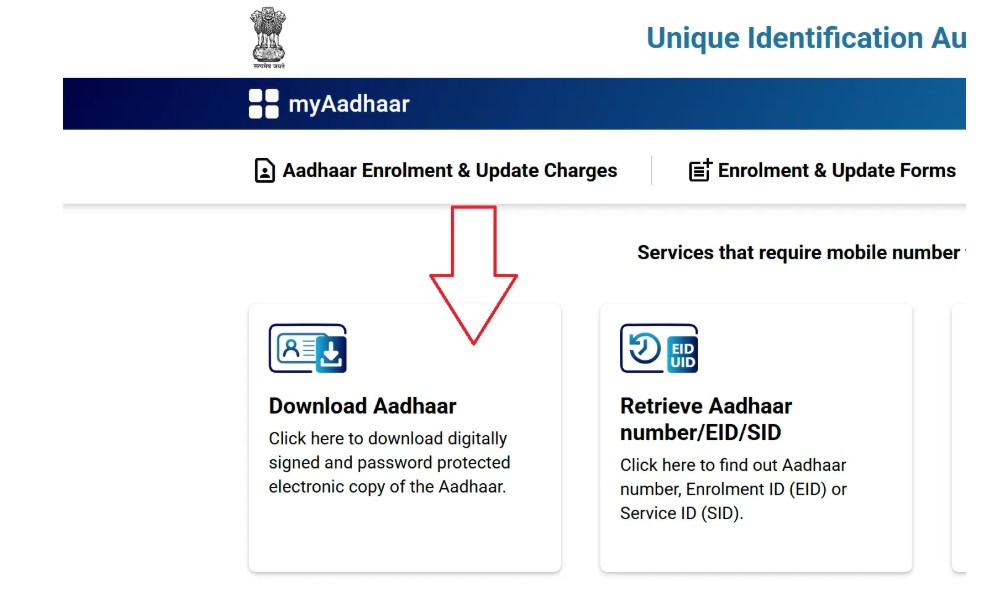
- To get Aadhaar in digital form, visit the official UIDAI portal (myaadhaar.uidai.gov.in login).
- Select Download Aadhaar from the menu.
- Choose to download using Aadhaar Number, Enrolment ID, or Virtual ID.
- Enter details correctly → Aadhaar number/EID/VID, Name, Pin Code, Captcha.
- Click on Send OTP → An OTP will be sent to your registered mobile.
- Enter the OTP to verify your identity.
- Click Download Aadhaar → Save the PDF file on your device.
- Open the file using the default password format (explained below).
Password to Open e-Aadhaar PDF
Every e-Aadhaar PDF is encrypted for privacy. To open it, use this password format:
First four letters of your name (CAPITALS) + Year of Birth (YYYY)
Examples:
- Name: SURESH, DOB: 1990 → SURE1990
- Name: ANITA, DOB: 1985 → ANIT1985
- Name: OM, DOB: 1992 → OM1992
Important Tips:
- Always use the name spelling as per Aadhaar records.
- Spaces in names are ignored (e.g., SAI KUMAR → SAIK).
- If Aadhaar has only initials, use them in the same format.
Different Ways to Download e-Aadhaar
UIDAI provides multiple download options to suit residents’ needs:
- By Aadhaar Number (UID): For residents with an active Aadhaar.
- By Enrolment ID (EID): For those who have applied but not yet received Aadhaar.
- By Virtual ID (VID): Ensures privacy, hides Aadhaar number.
Via mAadhaar App: Download and store Aadhaar digitally on your smartphone.
Download Masked Aadhaar Card
Masked Aadhaar allows you to share Aadhaar details without exposing the full number. It replaces the first 8 digits with “X” and shows only the last 4 digits (e.g., XXXX XXXX 4321).
This version is especially useful when Aadhaar is needed only for identity proof but not for full verification.
PVC Aadhaar Card Download vs e-Aadhaar Card PDF Download
- e-Aadhaar (PDF): Free, instant, downloadable, and legally valid.
- PVC Aadhaar: Wallet-sized, durable plastic card with holograms and QR codes, available online for ₹50 with doorstep delivery.
Both are valid. Many residents use e-Aadhaar for digital purposes and keep a PVC Aadhaar for offline use.
Common Issues While Downloading e-Aadhaar
| Problem | Cause | Solution |
|---|---|---|
| OTP not received | Mobile not registered or weak network | Ensure registered number, retry later, or update mobile at the Aadhaar center |
| Password not working | Wrong spelling or DOB mismatch | Check spelling on Aadhaar, use the correct format |
| Forgot Aadhaar Number/EID | Lost details | Use UIDAI’s “Retrieve UID/EID” service |
| Site not loading | The server is busy or under maintenance | Try off-peak hours, clear browser cache |
| Name/DOB mismatch | Incorrect data in Aadhaar | File update request at Aadhaar Seva Kendra |
Related Aadhaar Services
- Check Aadhaar Status: Track whether Aadhaar has been generated or updated.
- Retrieve UID/EID: Recover your Aadhaar number or enrolment ID.
- PVC Aadhaar Card Order Online Apply: Request a durable PVC Aadhaar card.
- Download Masked Aadhaar Card PDF: For safe sharing with hidden digits.
mAadhaar App: Manage Aadhaar on your smartphone.
Frequently Asked Questions about e-Aadhaar
Yes. e-Aadhaar is a digitally signed document issued directly by UIDAI and carries the same legal status as the physical Aadhaar card under the Aadhaar Act, 2016. You can use it for all official purposes, including banking, telecom, travel, government schemes, and KYC verification, just like the physical copy.
No. Since the download process requires OTP authentication for security, you must have a mobile number registered with your Aadhaar. Without this, you cannot complete the process online. If your mobile number is not linked, you will need to visit the nearest Aadhaar Seva Kendra to update it before downloading e-Aadhaar.
The PDF is protected to ensure only the Aadhaar holder can access it. The password is a combination of the first four letters of your name in CAPITALS (as per Aadhaar records), followed by your year of birth in YYYY format. Example: If your name is RAVI KUMAR and your birth year is 1990, the password will be RAVI1990. Make sure to match your name exactly as printed on Aadhaar.
There is no restriction on the number of times you can download e-Aadhaar. Once generated, your Aadhaar can be downloaded unlimited times free of cost from UIDAI’s official portal. This is particularly useful if you lose your printed Aadhaar, need multiple copies, or want the most updated version after making corrections.
Yes. Non-Resident Indians (NRIs) who have Aadhaar can download the e-Aadhaar online using their UID, EID, or VID. However, their Indian mobile number must be registered with Aadhaar to receive OTP for authentication. This makes it easier for NRIs to access Aadhaar instantly, even when they are abroad, especially for property, financial, or government transactions in India.
If you forget your Aadhaar Number (UID) or Enrolment ID (EID), you can use UIDAI’s “Retrieve Lost UID/EID” service. By entering your name, registered mobile number, or email, you can recover your Aadhaar credentials instantly. Once retrieved, you can log in again and download your e-Aadhaar without visiting a physical center.
If OTP is not received, first check if your mobile number is registered with Aadhaar and ensure you have network coverage. Sometimes delays happen due to heavy server load on UIDAI. In such cases, retry after a few minutes or request the OTP again. If the issue continues, update your mobile number at an Aadhaar Seva Kendra to ensure smooth downloads.
Yes. Downloading your e-Aadhaar from UIDAI’s official portal is completely free. Unlike the PVC Aadhaar, which costs ₹50, the PDF version can be downloaded multiple times at no charge. You can store it on your phone, computer, or cloud storage, and print it whenever you need a physical copy.
Yes. e-Aadhaar is legally equivalent to the Aadhaar card and can be used in banks for KYC, at telecom centers for SIM activation, at airports for identity verification, and across government offices for subsidies and benefits. Both the physical Aadhaar and the digital version are universally accepted in India.
If your e-Aadhaar contains incorrect details such as spelling mistakes, wrong address, or outdated information, you must update your Aadhaar records. Some details, like address, can be corrected online via the Self-Service Update Portal, while others, such as name, date of birth, or biometrics, require visiting an Aadhaar Seva Kendra. Once updated, you can download the corrected e-Aadhaar again.